iOS 17 represents the latest iteration of Apple's mobile operating system, specifically designed for the iPhone. Unveiled in June, iOS 17 is currently undergoing beta testing and is scheduled for release in September, coinciding with the launch of new iPhones. This update introduces several enhancements to the Phone, FaceTime, and Messages apps, along with various refinements for other applications. Additionally, Apple has announced the introduction of a brand-new app later this year, specifically geared towards journaling.
One of the key areas of focus for Apple in iOS 17 is communication, leading to a significant revamp of the Phone app. Notably, users now have the ability to create personalized Contact Posters that recipients will see when receiving calls. This feature allows customization options such as selecting a photo or Memoji, choosing a preferred font, font color, and more. Contact Posters can be utilized within the Phone app as well as third-party applications.
Moreover, iOS 17 introduces the Live Voicemail feature, which provides real-time transcriptions of voicemail messages directly on the Lock Screen as they are being delivered. Users can conveniently decide whether to answer the call based on the transcription content. Additionally, calls flagged as spam by carriers will be instantly rejected and won't appear as Live Voicemail notifications.
Another notable addition is NameDrop, a new functionality integrated into AirDrop. NameDrop enables users to share contact information by simply bringing their iPhones in proximity to each other. This capability extends to Apple Watch as well. In addition to contact sharing, the act of bringing two iPhones together can initiate SharePlay, facilitating collaborative activities such as music listening, movie watching, game playing, and content transfer. Later this year, AirDrop will also enable large file transfers between two nearby iPhones, with the transfer process completed via iCloud.
The FaceTime app in iOS 17 now supports both audio and video messages. If a user is unable to answer a call, the caller has the option to leave a video recording or an audio message instead. FaceTime also introduces a range of Reactions, including hearts, balloons, fireworks, laser beams, and rain, which can be activated through gestures. These effects are not limited to FaceTime alone but can also be utilized within compatible third-party applications.
Furthermore, iOS 17 allows users to link their iPhone or iPad with the Apple TV 4K for FaceTime sessions on the television. Leveraging the Continuity Camera feature, an iOS device serves as the camera during a FaceTime call, with the video displayed on the larger screen of the TV. This integration supports features such as Center Stage framing and call transfer through Handoff between the iOS device and the TV.
In the Messages app, users will encounter a cleaner interface that provides convenient access to apps, photos, and the camera. These options are discreetly tucked away behind a "+" button located next to the compose bar. Tapping on this button grants quick access to the Camera, Photos, Apple Cash, Audio Messages, personal Messages apps, and an updated Stickers experience.
In the latest update, all emoji characters have been transformed into stickers and are now located in the dedicated Stickers section of the Messages app. These emoji stickers can be utilized in the usual way or placed over images and messages just like regular stickers. Moreover, iOS 17 introduces the Remove Subject from Background feature, which was introduced in iOS 16, allowing users to create their own stickers from personal photos. If a Live Photo is used, it results in an animated sticker that can be shared within the Messages app. Stickers can be customized with special effects like a hand-drawn appearance, glitter, or different colors, and they can be used throughout iOS, essentially in any context where emoji can be used.

The search functionality within the Messages app now supports filters to help users find precisely what they're looking for. Users can initiate a broad search and subsequently narrow down the results by entering additional search terms. For those struggling to keep up with group chats or messages from individuals who send a high volume of texts, the catch-up arrow provides a clear indication of where they left off, allowing them to quickly identify unread content. Replies can be made directly within the conversation by swiping on a text bubble, and audio messages are automatically transcribed for convenient reading. One-time verification codes delivered via the Messages app can also be set to delete automatically.
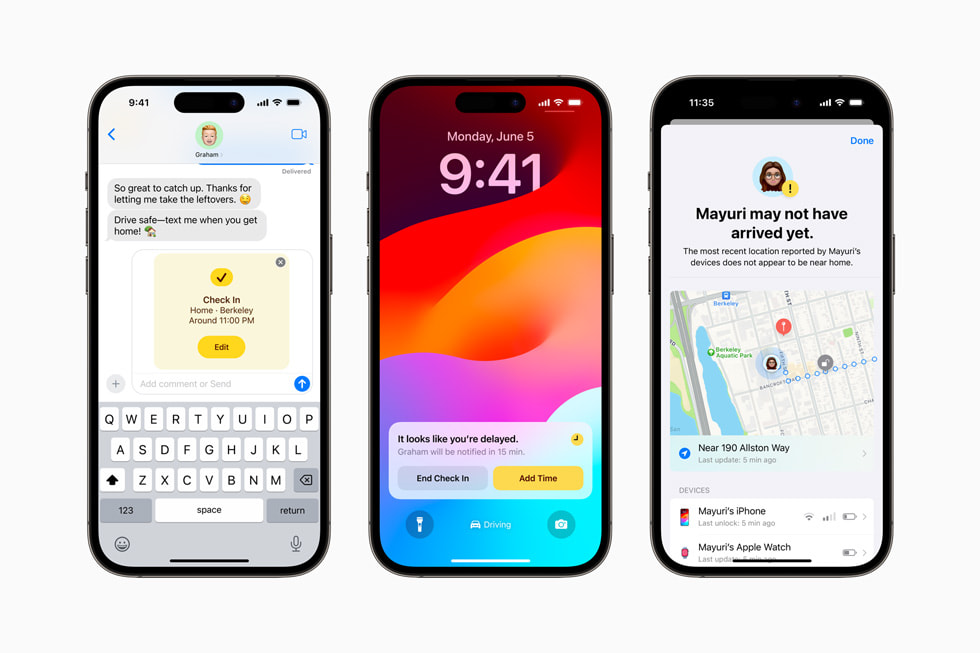
Location sharing in Messages has been streamlined, enabling real-time updates within conversations when a user shares their location. This feature works in conjunction with Check-In, a safety measure that notifies a friend or family member when the user arrives safely at their destination while traveling. When Check-In is activated, the recipient of the user's communication is alerted upon their arrival, and in case of delay or lack of progress, the contact can access the user's iPhone location, battery level, and cellular status to determine if assistance is required. Additionally, unsolicited nude photos can be blocked in messages, accompanied by a new nudity warning.
Apple has made significant improvements to the autocorrect function across iOS by implementing a new machine learning model that enhances the accuracy of predictive text suggestions. The autocorrect feature can now offer inline predictions to autofill entire sentences, making word or sentence completion as simple as pressing the spacebar. Correcting mistakes is also made easier with a single tap. Furthermore, there is a new speech recognition model for dictation, resulting in improved accuracy.
When the iPhone is not in use, placing it horizontally on a charger activates StandBy mode, which displays relevant information in a full-screen format for quick and easy access. StandBy mode works ideally with an always-on display, but it can also be accessed with a simple tap. This mode is reminiscent of Nightstand mode on Apple Watch and offers a variety of clock styles, photos, calendar events, weather updates, a view of Live Activities, or customizable widgets via the Smart Stack feature.

On the Home Screen, widgets now possess interactivity, enabling users to perform actions such as controlling music, activating smart lights, marking reminders as complete, and more directly from the widgets themselves. Spotlight Search has also become more interactive, allowing users to modify settings without having to open individual apps.
The Health app in iOS 17 introduces a mood tracking feature that enables users to log their daily emotions, allowing them to monitor their mental state over time. It offers various options for recording moods and their associated causes, facilitating valuable insights and connections. Additionally, Apple provides depression and anxiety assessments, commonly used in clinics, to assist users in assessing potential risks.
Utilizing the TrueDepth camera, the Health app includes a Screen Distance measuring tool within Screen Time, which helps determine if users are too close to their screens. Although primarily developed for children, adults can also benefit from this feature, as it alerts them if they are holding their device closer than 12 inches to their face.
While not currently available, iOS 17 will introduce a Journal app designed for daily recording of thoughts and activities. Leveraging on-device machine learning, the app suggests topics based on the user's daily actions, such as travel, workouts, social visits, and photography. Third-party apps can offer journaling suggestions, ensuring that all content remains protected and can even be secured with a passcode.
In Safari, private browsing now requires Face ID authentication and effectively blocks trackers from identifying the user's device or monitoring their browsing activities across websites. The introduction of Profiles allows users to separate their work and personal browsing, enabling distinct histories, extensions, Tab Groups, favorites, and cookies.

The Photos app gains the ability to recognize pets, and Visual Lookup now works with paused videos. The app can also identify food and provide recipes, as well as recognize storefronts, signs, and videos.
The Passwords app introduces a Family Sharing feature, enabling the sharing of passwords and passkeys among family members. With secure sharing through iCloud Keychain, all group members can add and edit shared passwords, making it particularly useful for passwords associated with shared services, such as streaming platforms.
Apple Music now supports Collaborative Playlists, allowing users to listen to music together with friends. Additionally, SharePlay in the car permits passengers to add songs to the current playlist through CarPlay, even without an Apple Music subscription. The new crossfade feature ensures seamless transitions between songs.

In the Maps app, users can now download offline maps for specific regions, enabling turn-by-turn navigation, estimated time of arrival, and access to nearby locations even without an internet connection. Apple has also updated its maps to provide enhanced trail information for parks across the United States, and real-time charging availability details for electric vehicles.
AirTags now support sharing with others, allowing friends and family members living together to track items with an AirTag using the Find My app. This shared access enables everyone to view the item's location, play a sound, and utilize Precision Finding, and it extends compatibility to Find My network accessories.
AirPlay has been enhanced with smarter device sharing preferences and upcoming support for AirPlay on TVs in select hotels, making content access more convenient during travels. Signing into an iPhone with an Apple ID is now easier through a nearby device or by using an email address or phone number associated with the user's account.
For AirPods, new features include Adaptive Audio for AirPods Pro 2, which combines Active Noise Cancellation with Transparency to allow users to be more aware of their surroundings while reducing unwanted noise. Conversation Awareness automatically lowers music volume when someone is speaking, enhancing conversation clarity. Personalized Volume adjusts sound to individual preferences. Automatic Switching between devices has been improved for faster and more reliable transitions, and users can now mute and unmute sound by holding the AirPods stem.
The Home app now provides a 30-day activity history for door locks, garage doors, contact sensors, and alarm systems. Moreover, PIN codes and tap-to-unlock features are compatible with Matter-based smart locks.
Activating Siri has become more convenient in iOS 17, as users can now simply say "Siri" instead of "Hey Siri." This eliminates the need for the initial activation phrase and allows for issuing multiple commands consecutively without reactivating Siri. It's important to note that this feature is limited to newer devices.

The Mail app now supports automatic filling of verification codes, similar to how it works in the Messages app. Subscribers of Apple News can enjoy daily crossword puzzles and listen to Apple News+ Audio Stories directly within the Podcasts app.
Within the Fitness app, users can view highlights of their friends' workout activities and create personalized workout and meditation schedules using Apple Fitness+ Custom Plans. The Freeform feature offers an expanded set of drawing tools, including a watercolor brush, highlighter, and ruler.
For individuals at risk of losing their ability to speak, the Personal Voice feature allows them to create a customized voice that closely resembles their own. The Live Speech accessibility feature enables typed words to be spoken in real-time during in-person conversations, phone calls, or FaceTime interactions. Additionally, the Point and Speak functionality reads out text present on physical objects, catering to individuals with low vision or those who are blind.

No comments:
Post a Comment